A Substack export does not land cleanly in WordPress
The standard import gets the words across and leaves the rest of the move to you.
Junk widgets
Subscribe boxes, share buttons and Substack embeds come through as broken blocks scattered through every post.
The fix: Stripped out on import, free.
Broken images
Photos stay hotlinked to Substack’s servers, where they can break or disappear, and never reach your Media Library.
The fix: Copied into your Media Library, free.
Lost SEO
Old URLs stop resolving, inbound links point nowhere, and posts arrive with no alt text or meta descriptions.
The fix: 301 redirect map and AI SEO, Pro.
Three steps, one import
-
1
Export
Download your Substack export
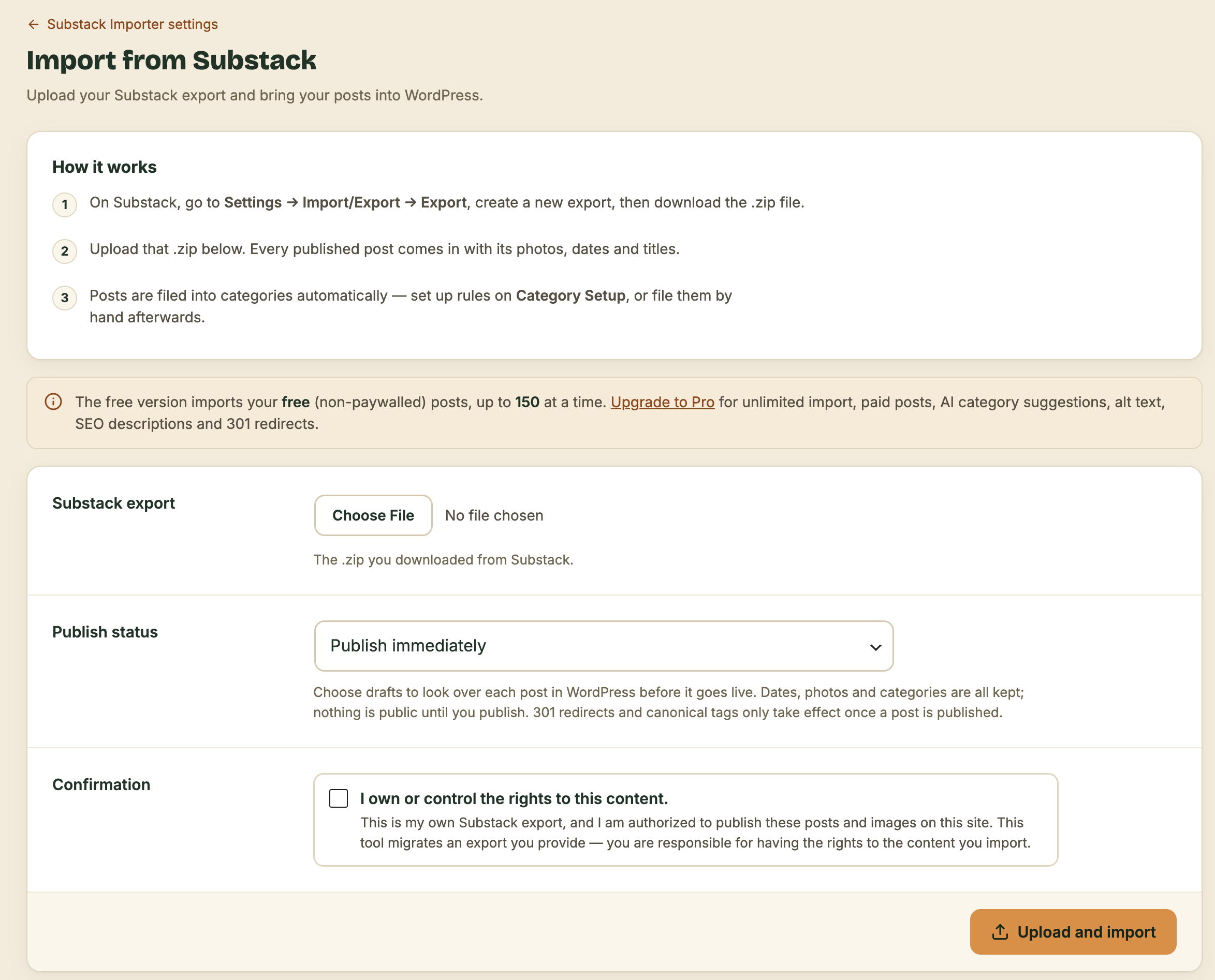
In Substack, open Settings, then Import/Export, and download the .zip of your publication.
-
2
Import
Upload the .zip to WordPress
Drop the file into the importer in your WordPress dashboard and choose how posts should be filed.
-
3
Done
Cleaned, filed and redirected
Widgets stripped, photos in your Media Library, posts in the right categories, and with Pro, every old URL redirected.
Start free. Upgrade when SEO matters.
Free lives on WordPress.org and imports up to 150 of your free, non-paywalled Substack posts. Pro removes the limit, brings in your paid posts too, and adds the redirects and AI work that keep your rankings.
| Capability | Free | Pro |
|---|---|---|
| Core Import | ||
| Every published post, with titles, subtitles and full body | ||
| Original post dates preserved | ||
| Featured and inline images copied into the Media Library, full resolution, de-duplicated | ||
| Galleries and image captions preserved | ||
| Only your Substack-hosted images by default, with external images opt-in | ||
| Subscribe, share and widget clutter cleaned into tidy figure markup | ||
| Links between your posts repointed to the new WordPress permalinks | ||
| Safe to re-run, with no duplicates | ||
| Reliability and Control | ||
| Resumable import, continuing where it stopped from the Status tab | ||
| Gentle mode for shared hosting, on by default | ||
| Stop button and posts-per-cycle pacing | ||
| Live progress, Status tab and a final report with skip reasons | ||
| Publish live or import as drafts to review first | ||
| Ownership confirmation, so you migrate only content you own | ||
| Categories and Filing | ||
| Smart matching to your existing categories | ||
| Ordered custom rules: contains, starts with, equals or regex | ||
| Fallback category and guardrails that protect hand-filed posts | ||
| Canonical handling: keep Substack, self-canonical or neither | ||
| Scope | ||
| Posts per migration | Up to 150 total | Unlimited |
| Which Substack posts | Free (non-paywalled) only | Free and paid |
| Selective import by keyword, series or date range | ||
| Batch size for large archives: 5, 10, 20, 50 or all | ||
| SEO and Search | ||
| 301 redirect map, exported as CSV, Apache or nginx | ||
| AI meta descriptions, native and in Yoast or Rank Math | ||
| AI Enrichment | ||
| Bring your own Anthropic or OpenAI key | ||
| AI categories: a clean, reader-facing taxonomy with every post filed | ||
| AI alt text for every image, including featured images | ||
| Support | ||
| Support channel | Community | Priority |
Move platforms without losing your rankings
Google has already indexed your Substack URLs, and other sites link to them. Pro makes sure that equity follows you to WordPress.
301 redirect map
Every old Substack post URL is mapped to its new WordPress address with a permanent 301 redirect, so search engines transfer the ranking and readers following old links land on the right post.
AI meta descriptions
A specific, keyword-aware meta description for each imported post, written natively and into Yoast or Rank Math, so search results show more than a truncated first paragraph.
AI alt text
A description of every image, featured images included, for accessibility and image search. Substack exports usually have none.
AI categories
A clean, reader-facing category list built from your actual posts, with every post filed into it.
Your own AI key
Connect an Anthropic or OpenAI key, and disconnect or purge it anytime. Your content goes straight from your site to the provider.
Pay once. Keep it.
Lifetime updates. No subscription, no renewal.
- Everything in Free
- Unlimited posts, free and paid
- 301 redirect map
- AI meta descriptions, alt text and categories
- Selective import and batch sizes
- Priority support
- Lifetime updates
Secure checkout by Freemius, our Merchant of Record. By purchasing, you agree to the EULA and Terms and Conditions.
Not ready? Get the free version on WordPress.org.
Questions
Is this a scraper?
No. It reads only the export .zip you download from your own Substack dashboard, then recreates those posts in WordPress. It never crawls Substack and cannot pull anyone else’s content.
Does it import paid posts?
With Pro. Your export contains the full text of paywalled posts, and Pro can import free posts, paid posts or both. The free version imports only free, non-paywalled posts.
How do I bring in posts published after my export?
Download a new Substack export later and run the importer again. It adds only the new posts and never creates duplicates. The free version counts toward its 150-post total.
What is the refund policy?
Checkout and refunds are handled by Freemius, our Merchant of Record. The refund policy is shown at checkout, and [email protected] can help with an eligible refund.
How do updates work?
Pro includes lifetime updates. You pay once, and every future version arrives through the normal WordPress plugin updates screen. There is no renewal.
How many sites can I use it on?
A Pro license covers one WordPress site. Multi-site licenses may come later.